Robot vacuum buying guide for 2026
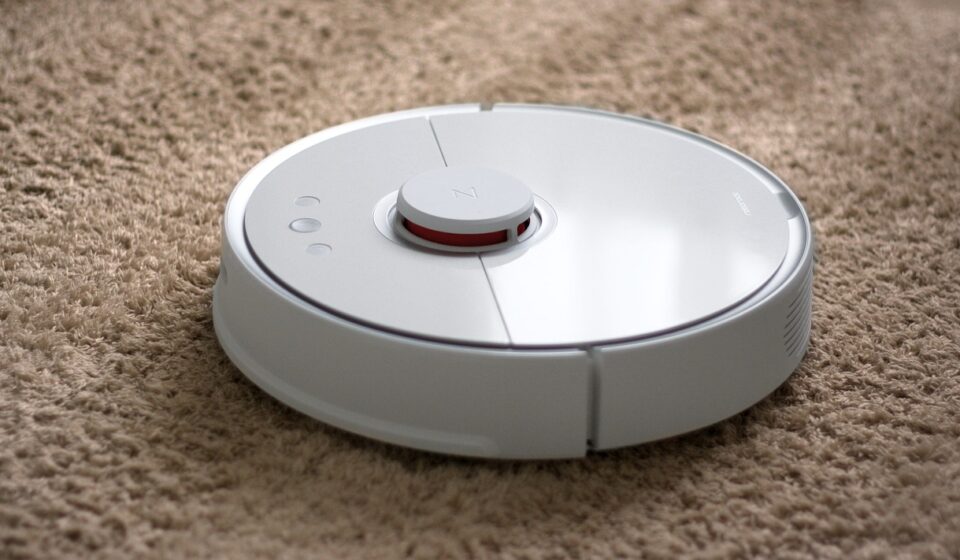
Start with the job your robot vacuum must actually do
Robot vacuum buying in 2026 should start with the home, not the model name. The category now runs from simple maintenance cleaners to robot vacuum and mop systems with LiDAR mapping, object recognition, auto-empty docks, mop washing, and app-based room controls. The right choice depends on the work you expect the machine to do: daily dust pickup, pet-hair control, light mopping, low-touch dock maintenance, or coverage across a larger floor plan.
The practical rule is to buy the least complicated robot that can reliably handle your layout and mess type. A premium dock is useful if you will run the robot several times a week. Advanced obstacle avoidance matters more in homes with toys, cables, and pets. Strong vacuum specifications can help, but independent cleaning results, brush design, navigation behavior, and upkeep costs often matter more than a large suction number on a product page. You can also explore more in BUYING GUIDES.
For more appliance and home-product decision guides, browse the buying guides section.
Match the robot to your flooring and floor plan
The first buying decision is where the robot will work most often. Robot vacuums can be useful on hard floors, low- to medium-pile carpet, and mixed surfaces, but performance varies by environment. An open hard-floor layout needs different features from a home with rugs, pet hair, chair legs, and multiple thresholds.
For mostly hard floors, prioritize edge cleaning, fine-dust pickup, navigation consistency, and a mop system that can lift or avoid carpeted areas if rugs are nearby. For carpet-heavy homes, look closely at brush-roll design, anti-tangle performance, carpet boost behavior, and whether the robot can recharge and resume without losing its place. For mixed homes, mapping accuracy and room-by-room control become more important because you may want vacuum-only cleaning in some rooms and vacuum-plus-mop cleaning in others.
| Home condition | Feature to prioritize | Why it matters |
|---|---|---|
| Mostly hard floors | Reliable navigation, edge cleaning, fine-dust pickup | Dust and grit show quickly, especially near baseboards and under cabinets. |
| Many rugs or carpeted rooms | Brush design, carpet detection, recharge-and-resume | Carpet cleaning uses more power and can take longer than hard-floor cleaning. |
| Pets | Anti-tangle brush, larger bin or auto-empty dock, obstacle avoidance | Hair fills small onboard bins quickly, and cords, toys, or pet waste can interrupt cleaning. |
| Large floor plan | LiDAR or strong mapping, multi-floor maps, battery management | Random navigation wastes time and may miss areas in larger or divided layouts. |
| Cluttered rooms | Object recognition and editable no-go zones | The robot needs help avoiding cables, socks, toys, and fragile areas. |
Before buying, measure thresholds, rug height, and the clearance under low furniture. Product height matters if you expect the robot to clean under sofas or beds. Threshold clearance matters if rooms are separated by raised transitions. These small measurements often determine whether a technically capable robot is convenient in daily use.
Navigation is more important than headline suction
Suction power is easy to advertise, but it is not a universal measurement across brands. Manufacturers may use pascal ratings, airflow claims, or internal test conditions that are not directly comparable. A robot with efficient navigation, a well-designed brush, and consistent floor contact can outperform a model that looks stronger on paper but misses areas or gets stuck.
Basic bump navigation
Entry-level robots often use bump-and-turn movement with limited mapping. These machines can work in small, simple rooms, but they are less predictable in larger spaces. They may clean the same area repeatedly, miss edges, or take longer to finish. For low-cost maintenance cleaning in a compact apartment, this may still be acceptable.
Camera and visual mapping
Camera-based systems can identify room features and support mapping or object detection. They may perform well when visible landmarks are available, but performance can vary in dim rooms. Camera-equipped robots also raise privacy questions. Buyers should review image-processing settings, app permissions, data controls, and whether obstacle images are stored, reviewed, or shared.
LiDAR mapping
LiDAR-based robots are popular because they can map rooms quickly and usually work well in low light. They are often strong choices for larger homes, multi-room cleaning, and users who want no-go zones, room labels, and scheduled cleaning by area. Some newer systems combine LiDAR with cameras or other sensors to improve both mapping and obstacle recognition.
Choose the mapping level based on layout complexity. If your rooms are open and tidy, a simpler robot may be enough. If your home has many rooms, furniture legs, rugs, and children’s or pets’ items on the floor, better navigation usually delivers more value than a small increase in suction rating.
Decide whether mopping is a bonus or a core feature
Robot vacuum and mop combinations have improved, but they are still maintenance tools. They are useful for light dust, footprints, and routine hard-floor upkeep. They are not a full replacement for manual scrubbing, especially on sticky spills, grout, textured tile, or dried stains.
There are three broad mop categories. Basic models drag a damp pad behind the vacuum. Midrange models may use vibrating or oscillating pads. Higher-end systems may use spinning mop pads, automatic mop lifting, clean-water tanks, dirty-water tanks, pad washing, and warm-air drying. Each step adds convenience, but it can also increase cost, dock size, noise, and maintenance.
If you have rugs, look closely at mop-lift height and carpet-avoidance behavior. A robot that slightly lifts a pad may still dampen a thick rug. If your home has many rugs or carpeted transitions, a vacuum-first model may be safer than paying for advanced mopping you will rarely use.
Consumer testing organizations, including Consumer Reports in its recent robotic mop coverage, have noted that hybrid models can vacuum and mop in one session, but real results vary by stain type, flooring, and cleaning method. Treat mopping claims as a convenience feature to verify, not as proof that the robot can handle every hard-floor mess.
Understand docks, dust bags, filters, and long-term cost
A dock can turn a robot vacuum from an occasional gadget into a routine cleaning system. The simplest docks only charge the robot. Auto-empty docks suction debris from the robot into a bag or container. More advanced docks may refill water, wash mop pads, dry them, and store dirty water. These features reduce daily effort, but they also add consumables and cleaning tasks.
- Auto-empty dock: Useful for pet hair, allergies, and frequent cleaning, but check bag price and availability.
- Bagless dock: Can reduce consumable costs, but emptying may release more dust.
- Mop-wash dock: Convenient for hard-floor homes, but dirty-water tanks and wash trays must be cleaned.
- Filter system: Look for clear replacement schedules and easily available filters.
- Brushes and side brushes: Confirm that replacements are sold separately before buying.
When comparing total cost, include the robot price, dock type, dust bags, filters, mop pads, replacement brushes, and possible battery replacement. A cheaper robot may cost more over time if parts are hard to find or if the onboard bin is so small that you stop using it. A more expensive dock may be worth it if it makes the robot easy enough to run daily.
Maintenance is not optional. Hair must be removed from rollers, sensors need wiping, wheels can collect debris, and filters lose airflow when clogged. A robot that is easy to clean will usually be used more consistently than one with a complicated brush compartment or hard-to-access bin. See also: BOX DESIGN.
Check privacy, app control, and smart-home dependence
Modern robot vacuums are connected devices. Many rely on an app for mapping, no-go zones, cleaning schedules, firmware updates, and room-specific control. This is convenient, but it also means the buyer should understand what happens to maps, images, account data, and device permissions.
Before purchasing a connected robot, review whether it can clean without the app, whether maps can be deleted, whether camera-based object images are optional, and whether the brand has a clear update policy. Manufacturer support pages from companies such as iRobot show how obstacle detection, mapping, and camera features may be managed through settings, but the exact controls vary by model and region.
If privacy is a major concern, consider a LiDAR-only or camera-free model, while recognizing the trade-off. Camera-free systems may reduce image-related concerns, while camera-equipped systems may offer stronger recognition of cables, shoes, toys, and pet-related hazards. The best choice depends on whether privacy control or object recognition is the higher priority in your home.
Smart-speaker compatibility is useful, but it should not decide the purchase. Voice control matters less than map accuracy, cleaning reliability, battery behavior, and parts availability. A robot that cleans well from its own app is usually a better purchase than one with many integrations but weak core performance.
Battery safety and reliability deserve attention
Robot vacuums use rechargeable battery systems, so charger quality and battery handling matter. ENERGY STAR materials on battery charging systems and UL materials on lithium-ion battery evaluation both reinforce a broader consumer-electronics principle: rechargeable products should be used with compatible chargers, undamaged battery packs, and manufacturer-approved components.
Buy from reputable retailers, avoid unknown replacement batteries, and do not use a robot with a swollen battery, damaged charger, melted plug, or unusual overheating. If a model is sold used or refurbished, check whether the battery is original, whether the dock is included, and whether the manufacturer still supports replacement parts. Also check product recall databases in your market before buying secondhand.
Reliability is also about software. Mapping, docking, and scheduling problems can sometimes improve with firmware updates, but updates depend on manufacturer support. For a connected robot, long-term value comes from both hardware durability and the brand’s willingness to maintain the app and firmware.
A practical buying checklist
Use this checklist before comparing final prices. It can help you avoid paying for features that look impressive but do not solve your actual cleaning problem.
- Map your need: Daily dust, pet hair, carpets, hard-floor mopping, or all of the above.
- Measure your home: Check furniture clearance, thresholds, rug height, and dock space.
- Choose navigation level: Basic bump navigation for simple rooms, LiDAR or advanced mapping for larger homes.
- Decide on mopping: Skip it for carpet-heavy homes; prioritize mop lifting and dock washing for hard-floor homes.
- Evaluate obstacle avoidance: Important if you have pets, children, cables, or cluttered floors.
- Calculate upkeep: Include bags, filters, pads, brushes, and batteries where applicable.
- Review privacy settings: Especially for camera-equipped robots and cloud-connected mapping.
- Check parts availability: A robot is only a good buy if consumables and support are easy to find.
For most buyers, the best value is not the cheapest robot or the most automated flagship. It is the model with reliable mapping, appropriate floor performance, manageable maintenance, and a dock that matches how often you plan to clean.
Frequently asked questions
Are robot vacuums worth it for carpets?
They can be worth it for maintenance cleaning, especially on low- and medium-pile carpet, but they should not be viewed as a complete replacement for a full-size vacuum. Look for strong carpet pickup, a good brush roll, anti-tangle design, and recharge-and-resume if your carpeted area is large.
Do I need LiDAR on a robot vacuum?
You do not always need LiDAR, but it is helpful in larger homes, multi-room layouts, and low-light areas. If you want reliable maps, room-specific cleaning, and no-go zones, LiDAR or another advanced mapping system is usually worth considering.
Is a self-emptying dock worth the extra cost?
A self-emptying dock is most valuable for pet owners, allergy-sensitive households, and anyone who wants scheduled cleaning without emptying the onboard bin after every run. If you have a small home and run the robot occasionally, a standard charging dock may be enough.
Can a robot vacuum and mop replace manual mopping?
Usually not. Robot mops are best for routine light cleaning, dust, and minor footprints. Manual mopping is still better for sticky spills, heavy stains, grout, corners, and deep cleaning.
What should I avoid when buying a robot vacuum?
Avoid choosing only by suction rating, discount size, or a long feature list. Also avoid models with unclear replacement-part availability, poor app support, limited mapping controls, or a dock that is too large for your space.